كابشن احترافي
بضغطة واحدة مع O Caption
Pro captions
in one click with O Caption
يفرّغ كلامك كلمة كلمة على جهازك، تراجع النص، تختار قالب وحركة، وينزل الكابشن على التايم لاين جاهز للتعديل. Transcribes your speech word by word on your own machine. Review the text, pick a template and a move, and the captions land on your timeline, ready to edit.
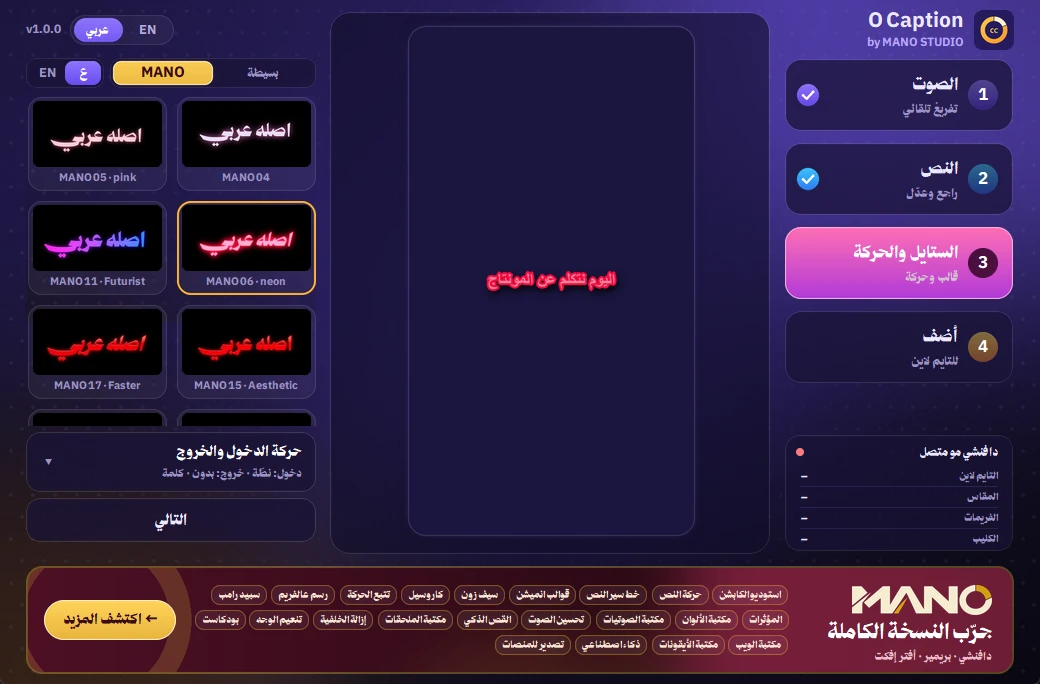
قوالب تخلي الفيديو يبان احترافيTemplates that make it look pro
نفس قوالب MANO، بمعاينة عربي أو إنجليزي. قالبين من كل لون مجاناً.The same templates as MANO, previewed in Arabic or English. Two of each colour are free.
كل اللي تحتاجه للكابشنEverything captions need
أداة صغيرة مستقلة، تشتغل داخل دافنشي من قائمة السكربتات.A small standalone tool that runs inside Resolve from the Scripts menu.
تفريغ ذكي على جهازكSmart, offline transcription
محرك Whisper يكتب كلامك كلمة كلمة بدون رفع الفيديو لأي مكان.Whisper writes every word on your machine — nothing is uploaded.
عدد الكلمات بيدكYou set the words
كلمة كلمة، أو من 2 إلى 4، أو جملة كاملة.Word by word, 2 to 4 words, or full lines.
راجع وعدّلEasy review
انقل كلمة، ادمج أو احذف، واضغط الوقت يروح له دافنشي.Move a word, merge, delete, or jump to its time.
حركة دخول وخروجIn & out motion
ظهور، نطّة، انزلاق، ضبابي، دوران، زوم… بالسرعة اللي تبيها.Fade, pop, slide, blur, spin, zoom… at your speed.
حرّك وكبّر على المعاينةMove & size it
امسك الكابشن واسحبه، وكبّره من الأطراف فوق فريمك الحقيقي.Drag it into place and resize from its corners over your real frame.
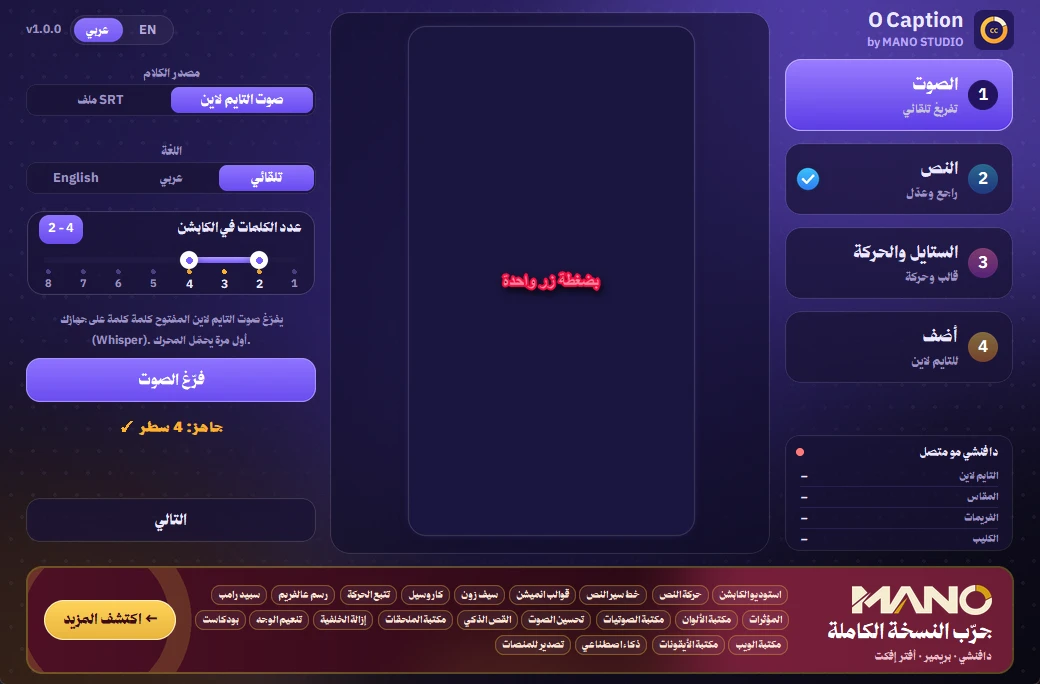
أربع خطوات وخلاصFour steps, done
الصوتAudio
فرّغ صوت التايم لاين أو استورد SRT.Transcribe the timeline or import an SRT.
النصText
راجع الأسطر وصحّح أي كلمة.Review the lines, fix any word.
الستايل والحركةStyle & motion
اختر القالب والحركة.Pick a template and a move.
أضفAdd
ينزل على تراك جديد، كل كابشن Text+ تعدّله.Lands on its own track as editable Text+.
جاهز في دقيقةReady in a minute
فك الضغط، انسخ ملف واحد، وافتحه من دافنشي.Unzip, copy one file, open it from Resolve.
Windows
- حمّل الملف وفك الضغط.Download and unzip.
- انسخCopy
O Caption.pyإلىto%APPDATA%\Blackmagic Design\DaVinci Resolve\Support\Fusion\Scripts\Utility - من دافنشي: Workspace ← Scripts ← O CaptionIn Resolve: Workspace → Scripts → O Caption
macOS
- حمّل الملف وفك الضغط.Download and unzip.
- انسخCopy
O Caption.pyإلىto~/Library/Application Support/Blackmagic Design/DaVinci Resolve/Fusion/Scripts/Utility - من دافنشي: Workspace ← Scripts ← O CaptionIn Resolve: Workspace → Scripts → O Caption
تبي أكثر؟ جرّب النسخة الكاملةWant more? Try the full MANO
O Caption جزء صغير من MANO. النسخة الكاملة فيها كل الـ 87 قالب وكل أدوات المونتاج بمكان واحد — دافنشي وبريمير وأفتر إفكت. O Caption is a small piece of MANO. The full suite has all 87 templates and every editing tool in one place — Resolve, Premiere and After Effects.
اكتشف MANO ←Discover MANO →أسئلة شائعةFAQ
هل هي مجانية فعلاً؟Is it really free?
إيه. فيها القوالب البسيطة و16 قالب من MANO، وبنر صغير يعرّفك على MANO الكاملة اللي فيها كل الـ 87 قالب.Yes. You get the simple looks and 16 MANO templates, plus a small banner about the full MANO with all 87.
يحتاج نت؟Does it need internet?
أول مرة بس عشان يحمّل محرك التفريغ. بعدها يشتغل على جهازك، وصوتك ما يطلع منه.Only the first time, to fetch the transcription engine. After that it runs on your machine.
أي نسخة دافنشي يدعم؟Which Resolve versions?
دافنشي ريزولف 18 وأحدث، المجاني أو Studio، على ويندوز وماك.DaVinci Resolve 18 or newer, free or Studio, on Windows and macOS.
أقدر أعدّل الكابشن بعد ما ينزل؟Can I edit captions afterwards?
أكيد. كل كابشن Text+ على تراك لحاله، تعدّله من الإنسبكتر.Sure. Each caption is Text+ on its own track; edit it in the Inspector.
يدعم الإنجليزي؟Does it do English?
إيه، التفريغ عربي وإنجليزي وتلقائي، والأداة فيها زر عربي / EN.Yes: Arabic, English or auto, and the app has an Arabic / EN switch.